MCP Setup
Connect edgar.tools to any AI assistant that supports the Model Context Protocol (MCP) — Claude, ChatGPT, Cursor, Windsurf, and more. Once connected, you can search companies, check insider trades, and monitor SEC filings in natural language.
MCP requires a free edgar.tools account. Sign up here if you don't have one — sign in with Google or email/password when prompted.
Claude.ai
The simplest way to connect — no config files, no tokens.
- Open claude.ai/customize/connectors, click the + at the top of the Connectors panel, then Add custom connector.
- Enter
edgar.toolsas the name andhttps://app.edgar.tools/mcpas the Remote MCP server URL, then click Add.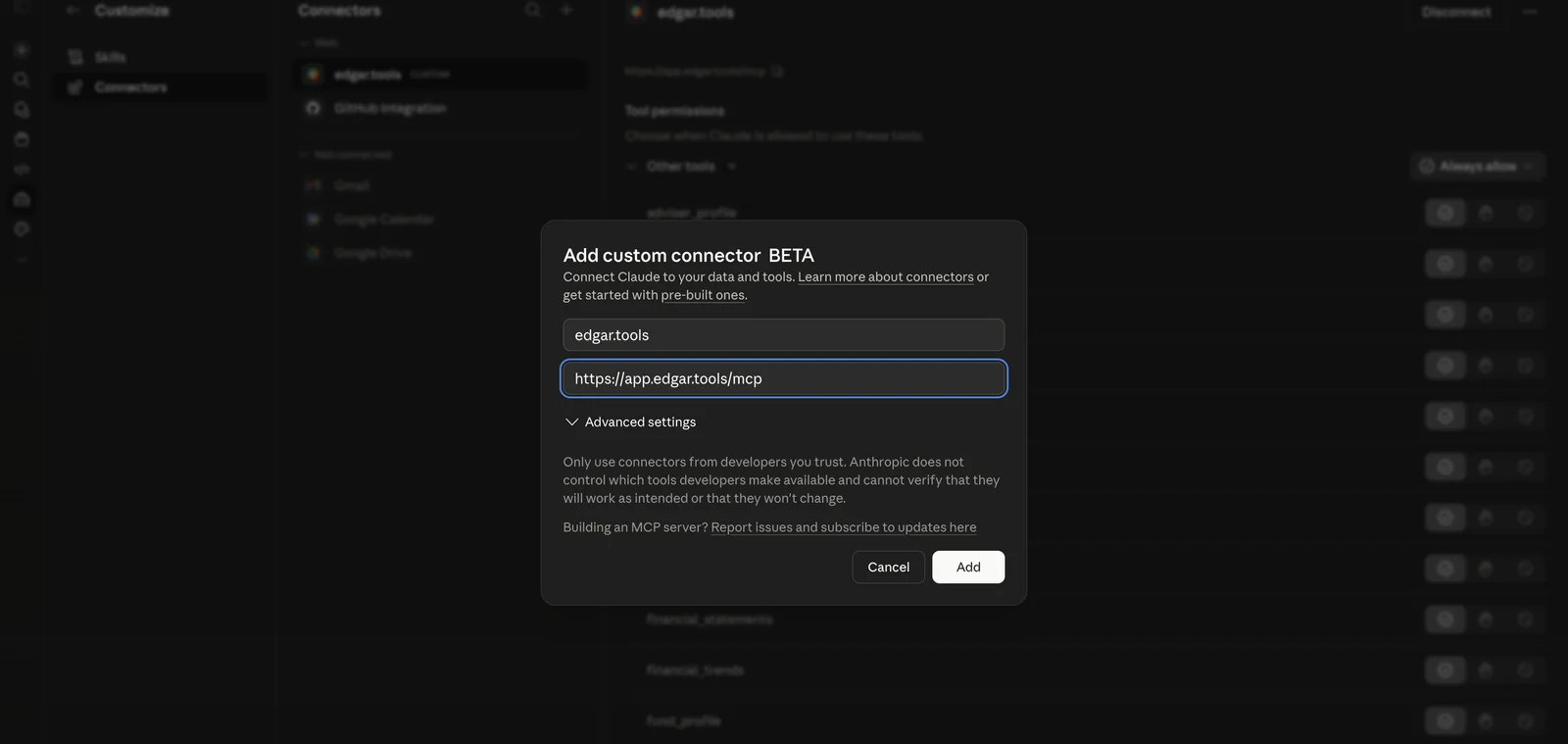
- Sign in. Claude opens a sign-in window with two options:
- Continue with Google — one click if you have a Google account. If you don't have an edgar.tools account yet, one is created automatically.
- Email & Password — use your edgar.tools email and password. Click "Sign up" at the bottom if you need to create an account.
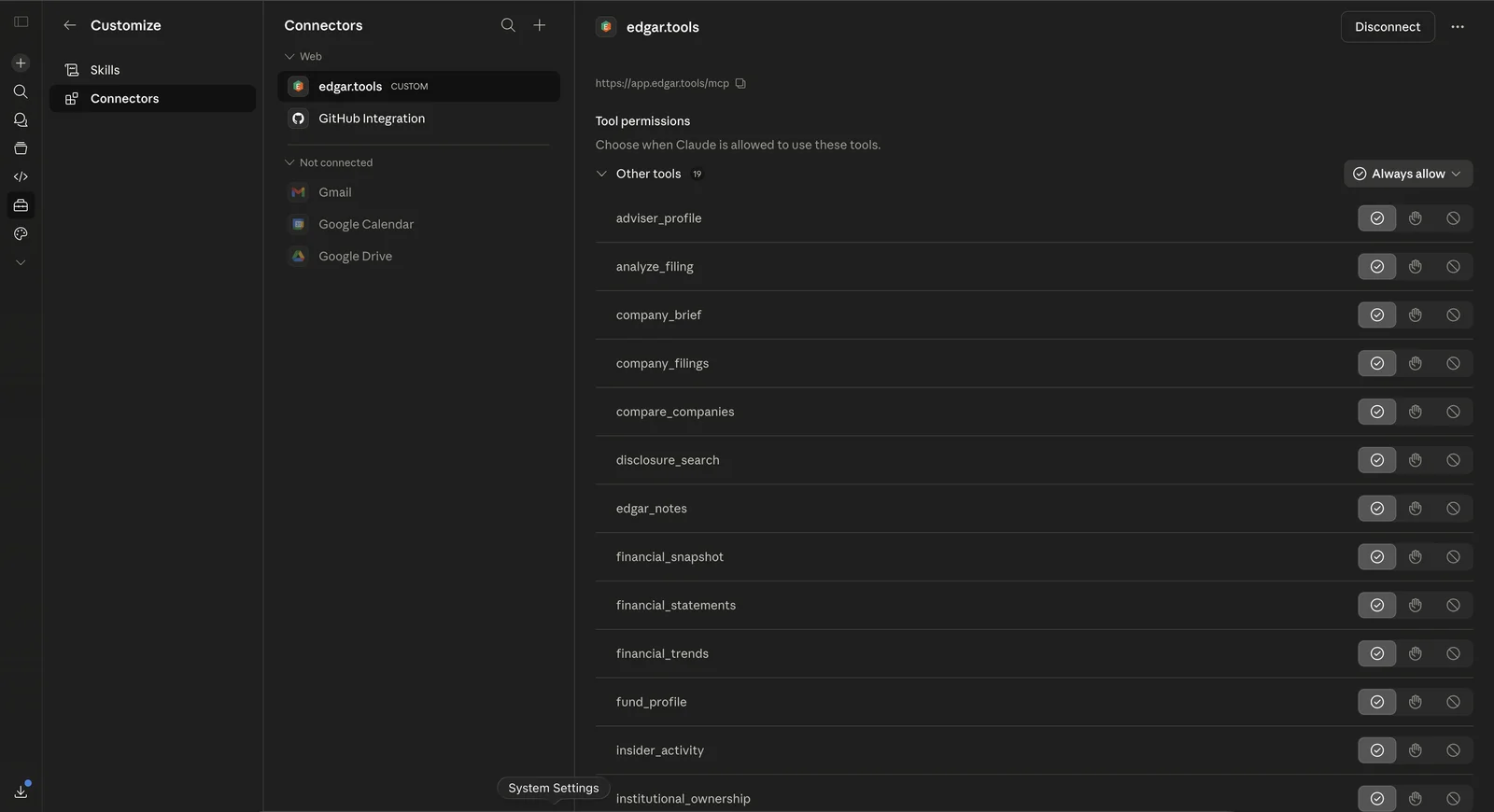
- Set tool permissions. After signing in, you'll see the tool permissions page listing the read-only tools your tier includes — Free accounts see 4, Pro sees 17, Analyst and Builder see all 23. Set the dropdown to Always allow for the smoothest experience, or leave as "Ask first" to approve each tool call individually. (See MCP Tiers for the full mapping.)
- Try it out. Start a new chat and ask: "Research Apple's latest financials and insider activity."
Claude Desktop
Add the edgar.tools MCP server to your Claude Desktop configuration.
- Open your Claude Desktop config:
- macOS:
~/Library/Application Support/Claude/claude_desktop_config.json - Windows:
%APPDATA%\Claude\claude_desktop_config.json
- macOS:
- Add this to your config file:
{ "mcpServers": { "edgar-tools": { "url": "https://app.edgar.tools/mcp" } } } - Restart Claude Desktop. You'll be prompted to sign in (Google or email/password) the first time you use an edgar.tools tool.
- Try it: "What insider trades happened at Tesla in the last 30 days?"
Claude Code
Add edgar.tools as a remote MCP server in Claude Code.
claude mcp add edgar-tools --transport http https://app.edgar.tools/mcp/Claude Code will prompt you to sign in (Google or email/password) in your browser when you first use an edgar.tools tool.
Cursor
Add edgar.tools as a remote MCP server in Cursor (v0.48+).
- Open MCP settings: Settings → MCP → Add new MCP server, or edit directly:
- macOS/Linux:
~/.cursor/mcp.json - Windows:
%USERPROFILE%\.cursor\mcp.json
- macOS/Linux:
- Add the server:
{ "mcpServers": { "edgar-tools": { "url": "https://app.edgar.tools/mcp" } } } - Cursor will open your browser to sign in (Google or email/password) the first time an edgar.tools tool is used.
Windsurf
Add edgar.tools to Windsurf's Cascade MCP integration.
- Open MCP config: click the MCPs icon in the Cascade panel, or edit directly:
~/.codeium/windsurf/mcp_config.json - Add the server:
{
  "mcpServers": {
    "edgar-tools": {
      "serverUrl": "https://app.edgar.tools/mcp"
    }
  }
}
Windsurf uses
serverUrlinstead ofurlfor remote HTTP servers. - Windsurf will open your browser to sign in when you first use an edgar.tools tool.
ChatGPT
Add edgar.tools as a Connector in ChatGPT (all plans).
- Enable Developer Mode: Settings → Apps & Connectors → Advanced settings.
- Create a Connector: Settings → Connectors → Create and enter:
- Name:
edgar.tools - Description: SEC filing intelligence — search companies, insider trades, and material events
- Connector URL:
https://app.edgar.tools/mcp
- Name:
- Open a new chat, click the + button near the message composer, select More, and choose edgar.tools.
OpenAI Agents SDK
Connect to edgar.tools programmatically using the OpenAI Agents SDK.
import asyncio
from agents import Agent, Runner
from agents.mcp import MCPServerStreamableHttp

async def main():
    async with MCPServerStreamableHttp(
        name="edgar-tools",
        params={
            "url": "https://app.edgar.tools/mcp",
            "headers": {"Authorization": "Bearer YOUR_OAUTH_TOKEN"},
        },
    ) as server:
        agent = Agent(
            name="SEC Analyst",
            instructions="Use MCP tools to answer questions about SEC filings.",
            mcp_servers=[server],
        )
        result = await Runner.run(
            agent,
            "What insider trades happened at Apple in the last 30 days?"
        )
        print(result.final_output)

asyncio.run(main())
The Agents SDK requires a Bearer token in the Authorization header. Obtain one through the OAuth 2.1 flow — see Authentication for details.
Next: try a prompt recipe
Once your client is connected, the fastest way to see what edgar.tools can do is to run a prompt recipe — a copy-paste LLM prompt that orchestrates multiple MCP tools into a structured analysis. FORGE (compounding-quality scorecard), 10-K speedrun, 8-K event triager, Form 4 reader, and risk-factor YoY diff are live.
How authentication works
MCP uses OAuth 2.1 with PKCE — but you don't need to think about any of that. Here's what happens behind the scenes:
- You ask your AI assistant a question about SEC filings
- The assistant calls an edgar.tools MCP tool
- Your browser opens to sign in — Google or email/password (first time only)
- A token is issued (valid 90 days) — all future calls are automatic
API keys vs MCP. MCP connections use OAuth tokens, not API keys. Do not use your etk_... API key for MCP connections.Permissions & tiers
What MCP can access. All edgar.tools MCP tools are read-only. edgar.tools cannot modify your data, send messages, or perform actions on your behalf. The MCP server only reads SEC filing data and returns structured results.
Tier-aware tool list. When your AI client calls tools/list, it sees only the tools your account's tier includes. Cross-tier invocations return a structured tier_denied error so the AI can route around it gracefully.
- Free — 4 tools (
search_companies,company_brief,company_filings,account_status). Truncated results with upgrade prompts when fuller data is available at higher tiers. - Pro ($24.99/mo) — 17 tools. Adds full financial statements, insider activity, institutional ownership, full-text search, real-time material events, the live filing feed, and the fund + adviser surface.
- Analyst ($79.99/mo) — 23 tools plus 5 recipe prompts. Adds AI-powered filing analysis (
analyze_filing), narrative-text disclosure search, financial-statement notes drill-down, three aggregation tools (position_intel,peer_facts,portfolio_events), and the recipe-prompt surface (position_thesis,peer_comparison,portfolio_pulse,earnings_postmortem,filing_red_flags). - Builder ($499/mo · waitlist) — same 23 tools and 5 recipe prompts as Analyst for v1. Configurable presets and custom prompts land later.
See MCP Tiers for the full per-tier mapping, or the AI plugin landing page for the visual ladder.
Reconnecting
If your AI assistant suddenly can't reach edgar.tools tools — for example, after a tier change or after we ship an update — reconnecting refreshes the connection.
You'll see one of:
- Claude says it can't access edgar.tools, or a tool call returns an authentication or permission error
- You upgraded your tier but still see Free-tier limits or "Upgrade to Pro" prompts
- Tools that worked yesterday return errors today
To reconnect, disconnect (see Revoking access below) and re-run the setup steps for your client. You'll be prompted to sign in again, and the new token reflects your current tier and the latest server version.
Tokens otherwise last 90 days — most users never see this.
Revoking access
To disconnect edgar.tools from your AI client:
- Claude.ai: Settings → Connectors → edgar.tools → ⋯ → Disconnect
- Other clients: Remove the server from your MCP config file
To summarize
- Add
https://app.edgar.tools/mcpto any MCP-compatible client. - Sign in with Google or email/password — authentication is automatic after first use.
- Tokens last 90 days — you'll rarely need to re-authenticate.
- All MCP tools are read-only. Your account's tier determines which tools
tools/listadvertises — see MCP Tiers.